
B2B Website Personalization: 25 Ways to Convert More Visitors.
Introduction
Business visitors do not arrive at a website with identical needs. A business owner researching digital marketing may want to understand services and commercial outcomes. A marketing director may be comparing providers, methods, and reporting. A procurement manager may need information about delivery, responsibilities, pricing, security, and supplier credibility. They may all be evaluating the same company, but they are looking for different answers.
B2B Website Personalization helps make the experience more relevant. It means adapting website content, recommendations, messages, and conversion paths to the needs or context of different business audiences. It does not mean building a separate website for every visitor. It means making useful information easier to discover and giving people appropriate next steps.
What Is B2B Website Personalization?
B2B Website Personalization is the process of adapting parts of a business website according to relevant information about visitors, their interests, or the context in which they arrive. Depending on the website and available data, this may involve changing introductory messages, recommending resources, highlighting industry-specific services, or presenting a more suitable next step.
25 Practical Ways to Personalize Your B2B Website
1. Segment Visitors by Industry
Different industries face different commercial challenges. A healthcare technology provider may prioritize trust, privacy, and specialized buyer education. A manufacturer may focus on distributors, product specifications, and international visibility. A software company may need to explain integrations, onboarding, and product adoption. B2B Website Personalization should start with industry research.
Identify the industries that represent your most valuable markets. Create useful pages that explain the challenges, services, and examples relevant to each group. Include genuine industry knowledge rather than simply replacing one industry name with another across copied pages.
Industry pages should answer practical questions. What problems does the audience face? What outcomes can your service support? What does implementation involve? What evidence can you provide? This makes B2B Website Personalization meaningful because visitors see information connected to their operating environment.
2. Build Pages for Different Buyer Personas
A business owner, marketing director, sales manager, and procurement professional may evaluate the same service from different perspectives. The owner may focus on commercial growth. The marketing director may look for campaign performance and reporting. Procurement may need scope, delivery expectations, and supplier credentials. B2B Website Personalization should reflect each buyer role.
3. Match Headlines to Visitor Intent
The headline is often the first message a visitor notices. A generic statement about being a full-service agency may not explain why a particular audience should continue reading. B2B Website Personalization aligns headlines with visitor intent.
Keep the headline specific, truthful, and consistent with the content below it. Use campaign-specific pages when traffic comes from a defined advertisement or email. This is a practical starting point for B2B Website Personalization because it aligns the first message with the reason someone clicked.
4. Personalize Calls to Action
A visitor discovering a problem may not be ready to book a sales meeting. Someone comparing providers may be ready to discuss a project. Showing both visitors the same urgent sales call to action can create unnecessary pressure. B2B Website Personalization makes calls to action relevant.
Make each call to action clear about what happens next. Avoid vague labels such as “Click Here.” Use descriptive language such as “Explore the SEO Process” or “Request a Website Consultation.” A thoughtful B2B Website Personalization plan gives visitors choices without hiding the main contact route.
5. Recommend Relevant Services
A company may offer several services, but an individual visitor may need only one or two. Someone reading about organic search could benefit from information about technical SEO, content strategy, or conversion optimization. A visitor exploring paid advertising may want to understand tracking, landing pages, and lead qualification. B2B Website Personalization can connect related service recommendations.
6. Use Industry-Specific Case Studies
Case studies help prospects understand how a provider approaches real business problems. A visitor from one industry may find an example from a similar company more useful than a general success story. B2B Website Personalization should feature relevant client evidence.
Organize approved case studies by industry, service, or business objective. Explain the original challenge, the work performed, the reasoning behind the approach, and the outcome. Use measurable results only when they are documented and approved for publication.
Do not imply that one client’s result is guaranteed for another. Explain relevant context, including the scope and timeframe where possible. Relevant evidence can strengthen trust and make B2B Website Personalization more credible.
7. Adapt Content to the Buying Stage
B2B buying journeys can involve several stages. Some visitors are identifying a problem, others are comparing approaches, and some are evaluating suppliers. B2B Website Personalization should reflect buying stage needs.
Connect these resources with clear internal links. A visitor reading an introductory guide should be able to find a relevant service page without searching the entire website. Do not force every reader into a sales conversation before they have enough information.
8. Create Account-Specific Experiences for High-Value Prospects
Account-based marketing may focus on a defined list of strategically important businesses. For suitable accounts, a provider can prepare tailored landing pages or resource collections that address an organization’s publicly known industry and business priorities. B2B Website Personalization can support selected account journeys.
An enterprise prospect may want information about implementation stages, integrations, governance, reporting, and support. A smaller company may care more about delivery speed, affordability, and direct communication.
Keep account-specific information accurate and appropriate. Do not expose confidential details or use personal information in a way that surprises visitors. Tailored content should demonstrate preparation and relevance, not make people feel monitored.
9. Use Location-Relevant Information Carefully
Location can influence service availability, regulations, time zones, language, and customer support. A company targeting customers in India may need regional market information, while an international prospect may want to understand communication arrangements and geographic coverage. B2B Website Personalization can adapt regional service information.
Create location-specific pages only when there are meaningful differences in the service or customer experience. Explain what is actually available in each region. Avoid thin pages that repeat the same content with different city names.
A visitor’s approximate location does not reveal their business requirements. Make regional information helpful, but allow visitors to choose another market or contact the company directly.
10. Personalize Forms According to Context
Long enquiry forms can discourage visitors, while forms that ask too little may not give the sales team enough information to respond effectively. B2B Website Personalization can make forms more relevant.
Match the fields to the purpose of the form. A consultation request might ask for a website address, business objective, and preferred contact method. A technical audit request may need the website URL and a short description of the issue. A downloadable resource may require very little information, or none at all.
Ask only for details that have a clear purpose. Explain why additional information is needed and avoid requesting sensitive data unnecessarily. Test forms on mobile devices and make error messages easy to understand.
11. Use Behavioural Signals to Recommend Content
Website behaviour can provide clues about visitor interests. Someone reading several SEO articles may be researching organic growth. A visitor exploring conversion pages may be investigating why enquiries are low. B2B Website Personalization should use behavioural signals carefully.
Use appropriate analytics and consent-based tracking to understand broad content interests. Recommend related articles, guides, or service pages when the connection is clear. Treat behaviour as an indicator rather than certainty: one page view does not prove that someone is ready to buy.
Make recommendations useful and easy to dismiss. Visitors should retain control over navigation and should not be trapped in a narrow content path.
12. Create Personalized Resource Hubs
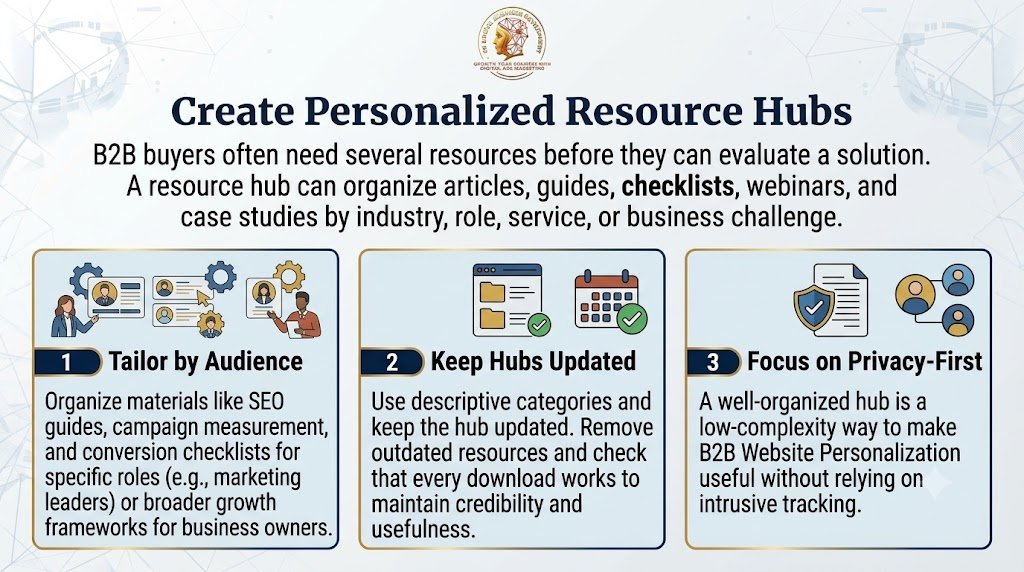
B2B buyers often need several resources before they can evaluate a solution. A resource hub can organize articles, guides, checklists, webinars, and case studies by industry, role, service, or business challenge. B2B Website Personalization can organize useful learning resources.
For example, a marketing leader may benefit from SEO guides, campaign measurement resources, conversion checklists, and reporting explanations. A business owner may prefer broader growth frameworks and supplier evaluation guidance.
Use descriptive categories and keep the hub updated. Remove outdated resources and check that every download works. A well-organized hub is a low-complexity way to make B2B Website Personalization useful without relying on intrusive tracking.
13. Adapt Navigation to Audience Needs
Navigation should help visitors find information quickly. If a company serves several markets, a long menu containing every service and article category can become confusing. B2B Website Personalization keeps navigation clear and consistent.
Organize the menu around meaningful groups such as industries, services, business challenges, resources, case studies, and contact options. Use familiar labels and avoid internal company terminology that visitors may not understand.
Do not make navigation unpredictable by changing essential menu items for different visitors. Personalization should improve discovery while preserving a consistent structure and a clear route to important pages.
14. Use Relevant Testimonials
Testimonials are more persuasive when visitors can relate to the customer sharing the experience. A technology company may value feedback from another technology business. A professional services firm may look for evidence that a provider understands complex decision-making. B2B Website Personalization can highlight relevant customer feedback.
Organize approved testimonials by service, industry, or customer type. Include names, roles, and company details only when permission has been granted. Keep quotations accurate and do not edit them in ways that change their meaning.
A testimonial should support the claims on the page, not replace detailed evidence. Where possible, connect feedback to a case study that explains the work and its context.
15. Personalize Follow-Up Experiences
The website experience continues after someone submits a form. A visitor requesting an SEO consultation should receive a relevant confirmation and understand what happens next. Someone downloading a beginner’s guide may benefit from additional educational resources. B2B Website Personalization can improve relevant follow-up communication.
Connect forms to suitable CRM or marketing automation workflows, subject to consent and applicable privacy requirements. Make sure messages reflect the actual enquiry and do not send unrelated promotions.
Give sales teams enough context to respond appropriately, but avoid treating every interaction as a sales-ready lead. A useful follow-up experience is timely, relevant, and respectful.
16. Create Campaign-Specific Landing Pages
Advertising, email, and social campaigns attract visitors with a particular expectation. If an advertisement promises information about lead generation but sends people to a generic homepage, the experience becomes disconnected. B2B Website Personalization aligns landing pages with campaigns.
Create landing pages that continue the original message. Match the headline, offer, supporting information, and call to action to the campaign. Remove unnecessary distractions while keeping company identity, privacy information, and essential navigation accessible.
Check that the page works on mobile and that conversion tracking records the intended action. Campaign consistency is one of the simplest ways to improve relevance and reduce wasted traffic.
17. Explain Pricing and Scope Clearly
Pricing is an important part of B2B evaluation. Some visitors want a starting price, while others need to understand the factors that influence project cost. B2B Website Personalization can clarify pricing and scope.
Where possible, explain pricing structures, service packages, project variables, and what is included. For complex services, describe how a quotation is prepared and what information is required.
Do not display misleading prices or suggest that an indicative estimate is a final quotation. Relevant pricing information can reduce uncertainty and help unsuitable prospects decide whether to continue.
18. Improve Mobile Experiences
B2B buyers may discover a company on a phone, read an article during a break, and return later from a desktop computer. The experience should remain clear across screen sizes. B2B Website Personalization should support mobile users effectively.
Prioritize readable typography, fast loading, simple navigation, accessible controls, and forms that are easy to complete. Make phone numbers and email links usable on mobile. Avoid pop-ups that cover essential content or are difficult to close.
Review mobile performance separately in analytics. If mobile visitors frequently abandon a form, investigate field layout, loading time, and usability before changing the entire website.
19. Use AI Recommendations With Human Oversight
AI can help identify content relationships, recommend resources, classify broad interests, and support website search. An AI-assisted system might suggest articles based on the topic a visitor is exploring. B2B Website Personalization can use AI with oversight.
However, recommendations must remain accurate and useful. Review generated content, monitor recommendation quality, and prevent automated systems from making unsupported claims about services or results.
Explain when visitors are interacting with an automated assistant where appropriate. Provide a route to human support for complex questions. Technology should make the experience easier, not create another barrier.
20. Improve Internal Website Search
Visitors who use internal search often have a specific information need. Search should return relevant service pages, articles, FAQs, and resources rather than unrelated results. B2B Website Personalization can improve internal search relevance.
Improve search quality with descriptive page titles, clear headings, accurate metadata, and sensible content categories. Review searches that return no results; they may reveal missing content or terminology that does not match the language customers use.
Where appropriate, prioritize important resources for common searches, but do not hide useful alternatives. Search should help visitors explore the site rather than force them into a predetermined sales path.
21. Use Dynamic Content Responsibly
Dynamic content allows selected website elements to change according to defined conditions. A campaign visitor may see a relevant introductory message, while a returning visitor may be directed to a related resource. B2B Website Personalization should use dynamic content responsibly.
Start with simple rules. Document what changes, why it changes, and what information is used. Test every variation on desktop and mobile. Maintain a consistent brand identity and ensure that essential information remains available to all visitors.
Do not use dynamic content to create misleading offers or inconsistent claims. A visitor should receive accurate information regardless of the version of a page they see.
22. Make Trust Information Easy to Find
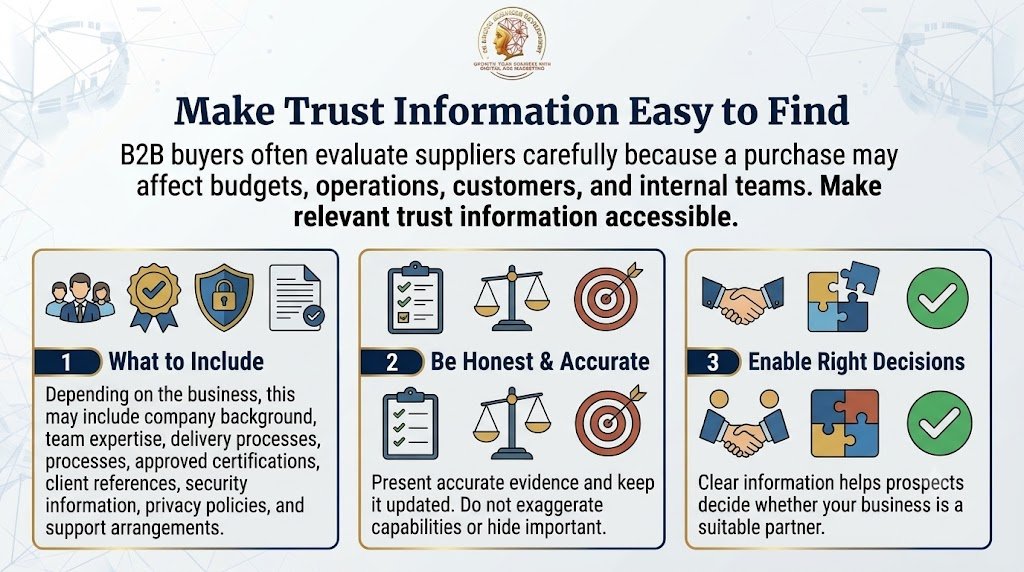
B2B buyers often evaluate suppliers carefully because a purchase may affect budgets, operations, customers, and internal teams. Make relevant trust information accessible. B2B Website Personalization should reinforce trust with evidence.
Depending on the business, this may include company background, team expertise, delivery processes, approved certifications, client references, security information, privacy policies, and support arrangements.
Present accurate evidence and keep it updated. Do not exaggerate capabilities or hide important limitations. Clear information helps prospects decide whether your business is a suitable partner.
23. Connect Personalization With CRM Data
A customer relationship management system can help a business understand enquiries, customer relationships, and previous interactions. When properly configured, CRM information may support more relevant website or follow-up experiences. B2B Website Personalization can connect relevant CRM context.
For example, existing customers may need support resources, while new prospects may need introductory service information. Sales teams may also benefit from knowing which service a person asked about.
Use appropriate permissions, data controls, and privacy safeguards. Keep records accurate and avoid using information for purposes that visitors have not been told about. The aim is a connected customer experience, not unrestricted data use.
24. Test Changes Before Expanding Them
A personalization idea may sound promising but still fail to improve business results. Test important changes against a suitable baseline or control experience. B2B Website Personalization needs structured testing before expansion.
Compare a general headline with an industry-specific headline, a standard call to action with stage-specific options, or generic recommendations with relevant resource suggestions. Define the primary success measure before starting.
Measure qualified enquiries, completed forms, consultation requests, or engagement with important resources according to the test objective. Do not judge success only by clicks if the real goal is better business opportunities.
25. Review and Improve the Experience Continuously
Customer needs, services, search behaviour, and business priorities change. Review whether audience segments remain useful, content is accurate, recommendations are relevant, and forms work correctly. B2B Website Personalization requires regular review and refinement.
Measure performance by industry, campaign, device, landing page, and conversion type where reliable data is available. Ask the sales team whether enquiries are becoming more relevant. Remove experiences that create confusion or provide no measurable benefit.
Continuous improvement keeps B2B Website Personalization connected to real customer needs instead of allowing it to become a collection of outdated rules.
How to Build a Practical Personalization Strategy
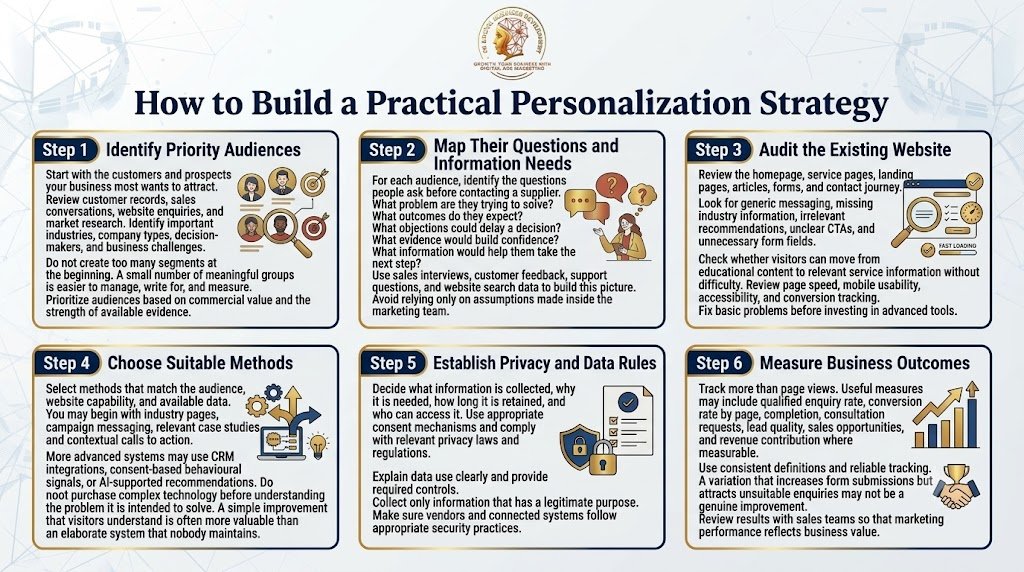
Step 1: Identify Priority Audiences
Start with the customers and prospects your business most wants to attract. Review customer records, sales conversations, website enquiries, and market research. Identify important industries, company types, decision-makers, and business challenges. B2B Website Personalization begins with audience segmentation research.
Do not create too many segments at the beginning. A small number of meaningful groups is easier to manage, write for, and measure. Prioritize audiences based on commercial value and the strength of available evidence.
Step 2: Map Their Questions and Information Needs
For each audience, identify the questions people ask before contacting a supplier. What problem are they trying to solve? What outcomes do they expect? What objections could delay a decision? What evidence would build confidence? What information would help them take the next step? B2B Website Personalization should map real buyer questions.
Use sales interviews, customer feedback, support questions, and website search data to build this picture. Avoid relying only on assumptions made inside the marketing team.
Step 3: Audit the Existing Website
Review the homepage, service pages, landing pages, articles, forms, and contact journey. Look for generic messaging, missing industry information, irrelevant recommendations, unclear calls to action, and unnecessary form fields. B2B Website Personalization starts with an honest audit.
Check whether visitors can move from educational content to relevant service information without difficulty. Review page speed, mobile usability, accessibility, and conversion tracking. Fix basic problems before investing in advanced tools.
Step 4: Choose Suitable Methods
Select methods that match the audience, website capability, and available data. You may begin with industry pages, campaign messaging, relevant case studies, and contextual calls to action. B2B Website Personalization should match available website resources.
More advanced systems may use CRM integrations, consent-based behavioural signals, or AI-supported recommendations. Do not purchase complex technology before understanding the problem it is intended to solve. A simple improvement that visitors understand is often more valuable than an elaborate system that nobody maintains.
Step 5: Establish Privacy and Data Rules
Decide what information is collected, why it is needed, how long it is retained, and who can access it. Use appropriate consent mechanisms and comply with relevant privacy laws and regulations. B2B Website Personalization must respect applicable privacy requirements.
Explain data use clearly and provide required controls. Collect only information that has a legitimate purpose. Make sure vendors and connected systems follow appropriate security practices.
Step 6: Measure Business Outcomes
Track more than page views. Useful measures may include qualified enquiry rate, conversion rate by landing page, form completion, consultation requests, lead quality, sales opportunities, and revenue contribution where measurable. B2B Website Personalization needs outcome-focused measurement and reporting.
Use consistent definitions and reliable tracking. A variation that increases form submissions but attracts unsuitable enquiries may not be a genuine improvement. Review results with sales teams so that marketing performance reflects business value.
A Practical 30-Day Implementation Plan
Week 1: Research and Audit
Identify three priority audience groups. Review the most visited service pages and landing pages. Collect common sales questions and objections. Identify generic messages and confusing conversion steps. Choose one primary business objective for the first improvement cycle.
Week 2: Create Relevant Experiences
Improve headlines on priority pages. Create or update industry-specific content. Add relevant case studies and approved testimonials. Improve calls to action and review enquiry forms. Make sure each page clearly explains the next step.
Week 3: Implement and Test
Configure campaign-specific landing pages. Add relevant resource recommendations. Test mobile layouts and forms. Check analytics and conversion tracking. Review privacy notices and consent requirements. Ask colleagues to test the complete journey as a new visitor.
Week 4: Measure and Improve
Compare results with the original baseline. Review enquiry quality with the sales team. Identify pages with unnecessary friction. Document successful changes and problems. Prepare the next improvement cycle based on evidence rather than assumptions.
This staged approach makes B2B Website Personalization manageable. It allows a business to learn from real visitor behaviour without rebuilding the entire website at once.
Frequently Asked Questions
What is B2B website personalization?
It adapts website experiences to relevant business audiences.
Why does it matter?
It helps buyers find useful information and suitable next steps.
Does it require AI?
No. Clear landing pages and relevant content are effective starting points.
Can small companies use it?
Yes. Begin with a few priority audiences and simple improvements.
How should results be measured?
Track qualified enquiries, lead quality, and business opportunities.
How is visitor privacy protected?
Collect necessary data, explain its use, and follow applicable requirements.
How long does implementation take?
Basic improvements may take weeks; complex integrations need more time.
Final Thoughts
A successful B2B website should do more than display company information. It should help different business audiences understand relevant services, find useful evidence, evaluate solutions, and take the next step with confidence. B2B Website Personalization works when relevance comes first.
That requires clear messaging, useful content, thoughtful navigation, relevant calls to action, reliable technology, and responsible data practices. B2B Website Personalization can bring these elements together by making the experience more relevant to the people who matter to your business.
Start with your most important audiences. Understand their questions. Improve the pages they visit. Test meaningful changes and measure qualified business outcomes. Do not personalize everything simply because you can. Personalize the parts of the experience that genuinely help visitors make better decisions.
At SG Digital Business Development, we connect SEO, AI Search Visibility, website development, conversion optimization, and digital business development to help businesses turn online visibility into meaningful opportunities.
Want to Make Your Website More Effective?
Contact SG Digital Business Development to discuss a website and conversion audit. We can help identify opportunities to improve website messaging, industry-specific landing pages, search visibility, content structure, conversion paths, lead capture, qualification, performance, and tracking.
Build a website that speaks to the right audience, answers important questions, and creates a clearer path from visitor to business opportunity.
Let’s build your digital future together. Contact SG Digital Business Development today and let’s engineer your global authority!